IstoVisio · B2B · Voice · AI
Redefined Task
Execution with an
AI Voice Interface
syGlass · January 2025

syGlass is a VR-based scientific visualization platform used by scientists to explore and analyze massive 3D datasets. As workflows became more complex, the number of interaction steps required to complete common actions increased significantly, breaking focus during analysis.
This project focused on reducing the time between user intent and system action through an AI-powered voice interface, allowing scientists to execute commands more efficiently while maintaining focus during analysis.
Problem
Scientists knew exactly what they wanted to do, but executing those actions required navigating multiple panels, configuring settings, and switching between tools. These repetitive interactions interrupted focus and slowed analysis during high-frequency workflows.
As workflows became more complex, the cost of these interruptions increased. The business needed a faster way for scientists to execute common actions without sacrificing precision or disrupting existing workflows.
Solution
I designed an AI-powered voice command system that translated spoken instructions into system actions.
The redesign included:
- • Designing voice as a workflow accelerator rather than a replacement for existing interactions
- • Supporting natural language variations to accommodate different accents, phrasing, and speaking styles
- • Creating clear recovery paths when commands were misunderstood to help users stay in control
Impact
The final solution reduced the time required to complete common workflows by 41%.
The redesign also:
- • Reduced the number of interaction steps required to perform common tasks
- • Improved efficiency for expert users during complex analysis sessions
- • Established a foundation for future AI-powered interactions within the platform
My role
As the founding designer, I:
- • Led the project end to end across research, voice UX, interaction design, prototyping, and validation
- • Defined the voice interaction model, command structure, and error recovery framework in partnership with engineering
- • Designed onboarding, discoverability, and trust mechanisms to support adoption within existing scientific workflows
Scientists working with complex 3D datasets frequently switched between analysis tools, visualization settings, and interaction controls. Even routine adjustments required them to interrupt their work and navigate the interface.
I explored whether voice could shorten these interactions while keeping the existing controls available for tasks that required precision or direct manipulation. I ran interviews and observational sessions with eight scientists across Europe and the United States to see where the interface broke their momentum.
“The software isn't difficult to use, but I constantly have to stop what I'm doing to make small adjustments.”
— Scientist, syGlass user research participant
Navigation Overhead
Completing even simple actions required moving through multiple panels, menus, and settings before users could make a change.
Context Switching
Routine adjustments such as changing opacity, toggling visibility, or modifying settings repeatedly interrupted analysis workflows.
Discoverability
Frequently used commands were buried within the interface, making them difficult to find and requiring repeated navigation to access.
Voice offered a way to execute frequent, well-defined actions without repeatedly opening menus. It was particularly useful for commands such as changing visualization settings or activating tools while working inside a VR environment. Shortcuts or additional controls could also have reduced interaction cost; voice did so without adding interface complexity.
I focused on actions where the user's intent could be translated into a predictable result. Direct manipulation and existing menu controls remained available when they offered better precision or control.
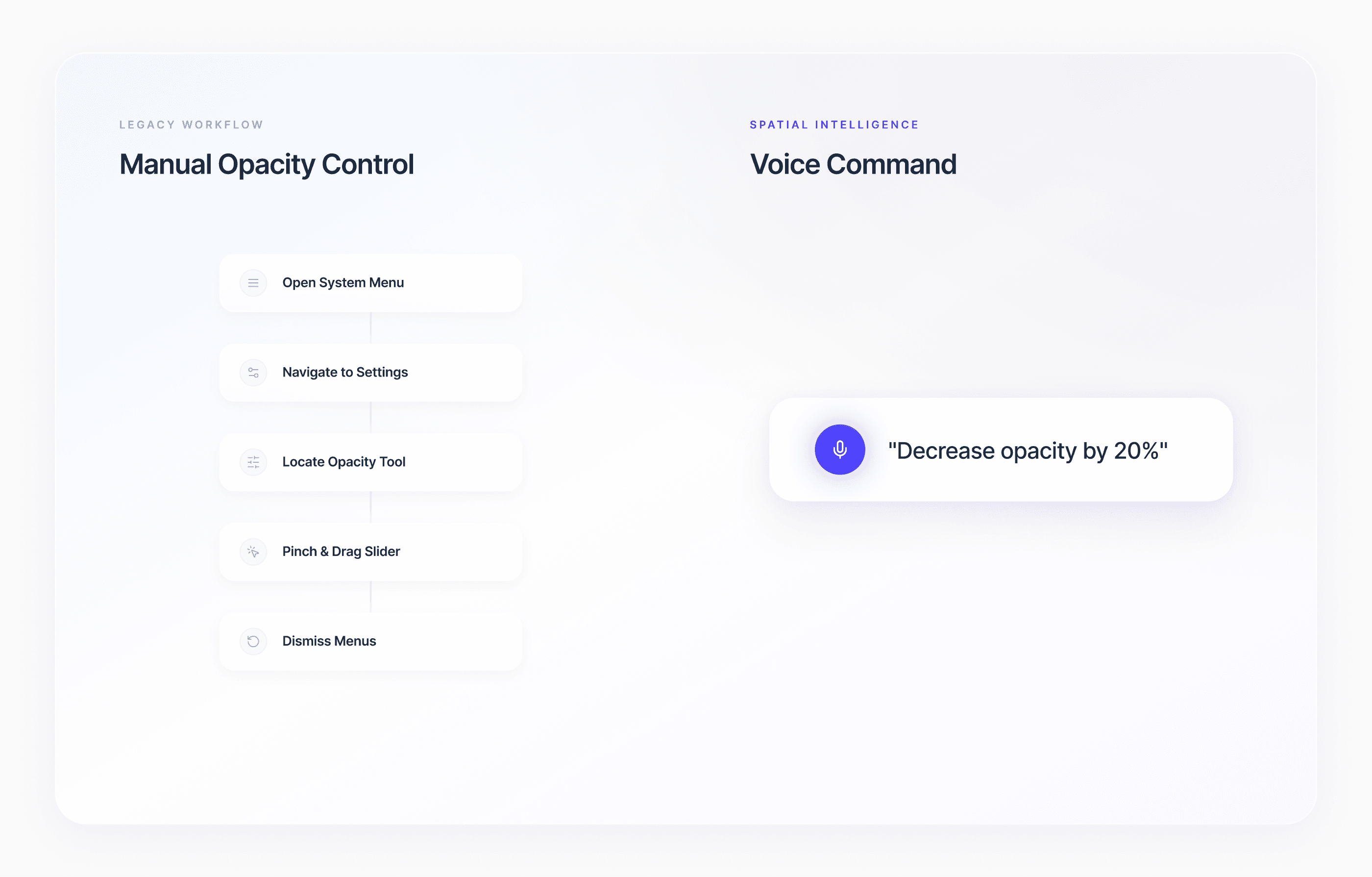
Scientists didn't always describe the same action in the same way. Some used direct commands, while others specified an amount, a target, or an exact value.
I worked on a command structure that accounted for these differences while keeping the resulting actions predictable. The design needed to distinguish between what users wanted to change, how they wanted to change it, and any values they provided.
Action
“Increase opacity”
An adjustment request without a specified amount.
Parameter
“Increase by 10%”
A relative adjustment with a specified value.
Target value
“Set to 0.5”
An absolute setting.
Other commands followed the same pattern, such as “Increase performance,” “Increase by 20%,” and “Set to 80.” Each command also accepted several phrasings to account for different vocabularies, accents, and levels of English fluency.
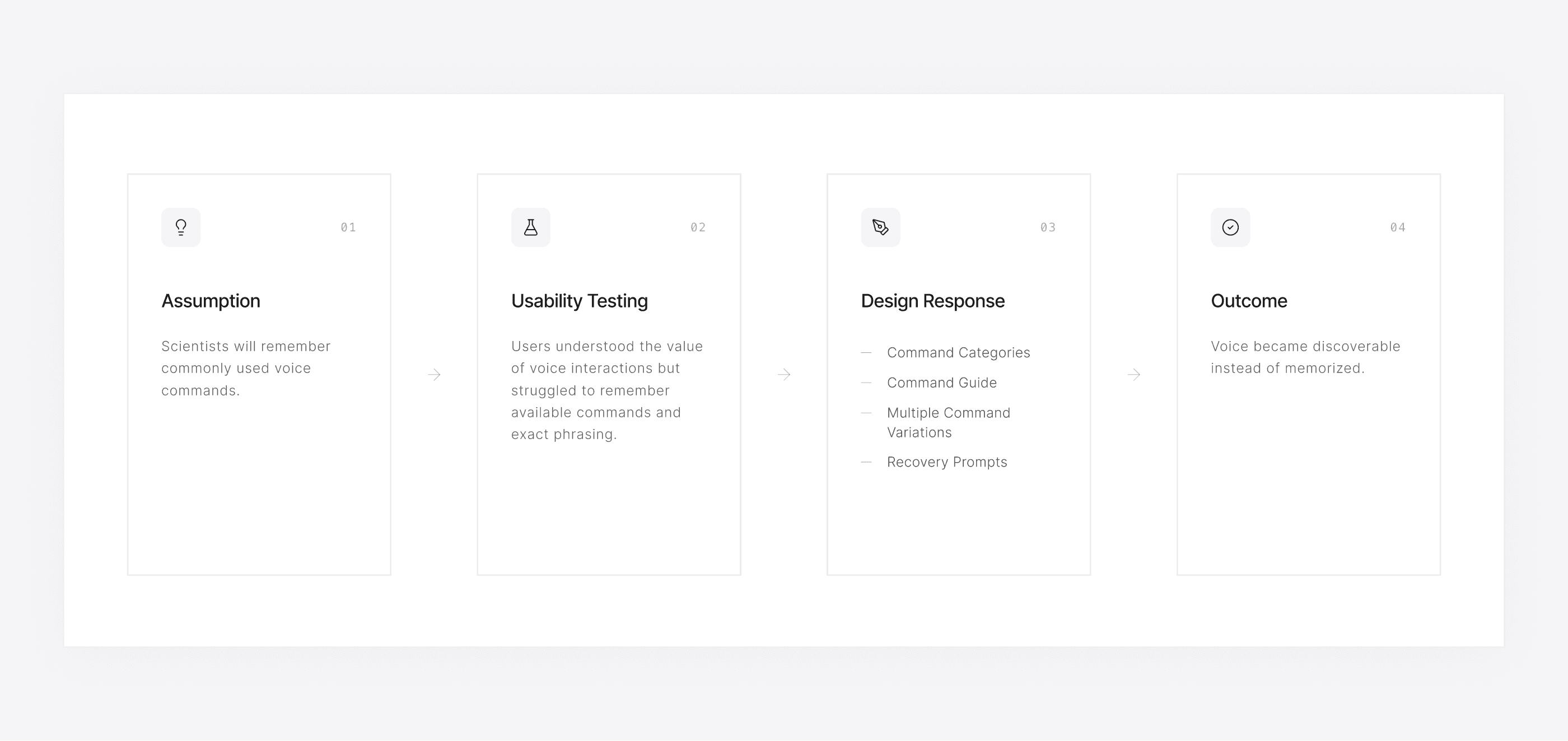
- What I tested
- Two rounds of remote usability testing with eight scientists, starting from the assumption that they would remember commonly used commands.
- What I observed
- Participants understood the value of voice but struggled to remember available commands and exact phrasing.
- What changed
- I added command categories, a command guide, multiple variations per command, and recovery prompts, so voice became discoverable without memorization.
- What remained a limitation
- Voice covered a defined set of commands in general settings, visualization, and data annotation. Everything else still went through the menus.
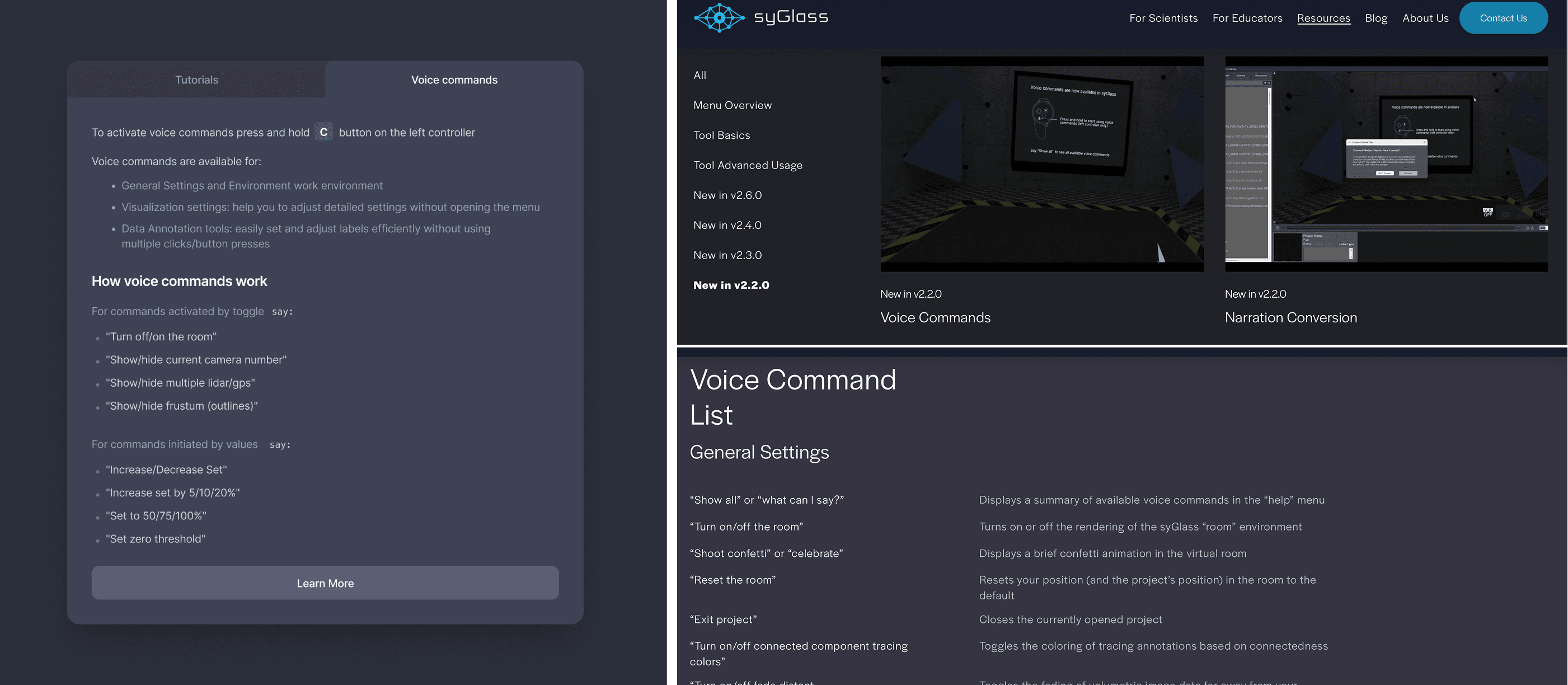
Supporting a command was only useful if scientists knew it existed and understood how to use it. I designed the discovery experience around the commands most relevant to common scientific workflows, helping users understand what they could say without memorizing an extensive vocabulary.
Scientists held the C button on the left controller to speak, and saying “What can I say?” listed the available commands. The guide grouped commands by area, with tutorials and a public command list for reference. Voice remained an optional interaction method alongside the existing interface.
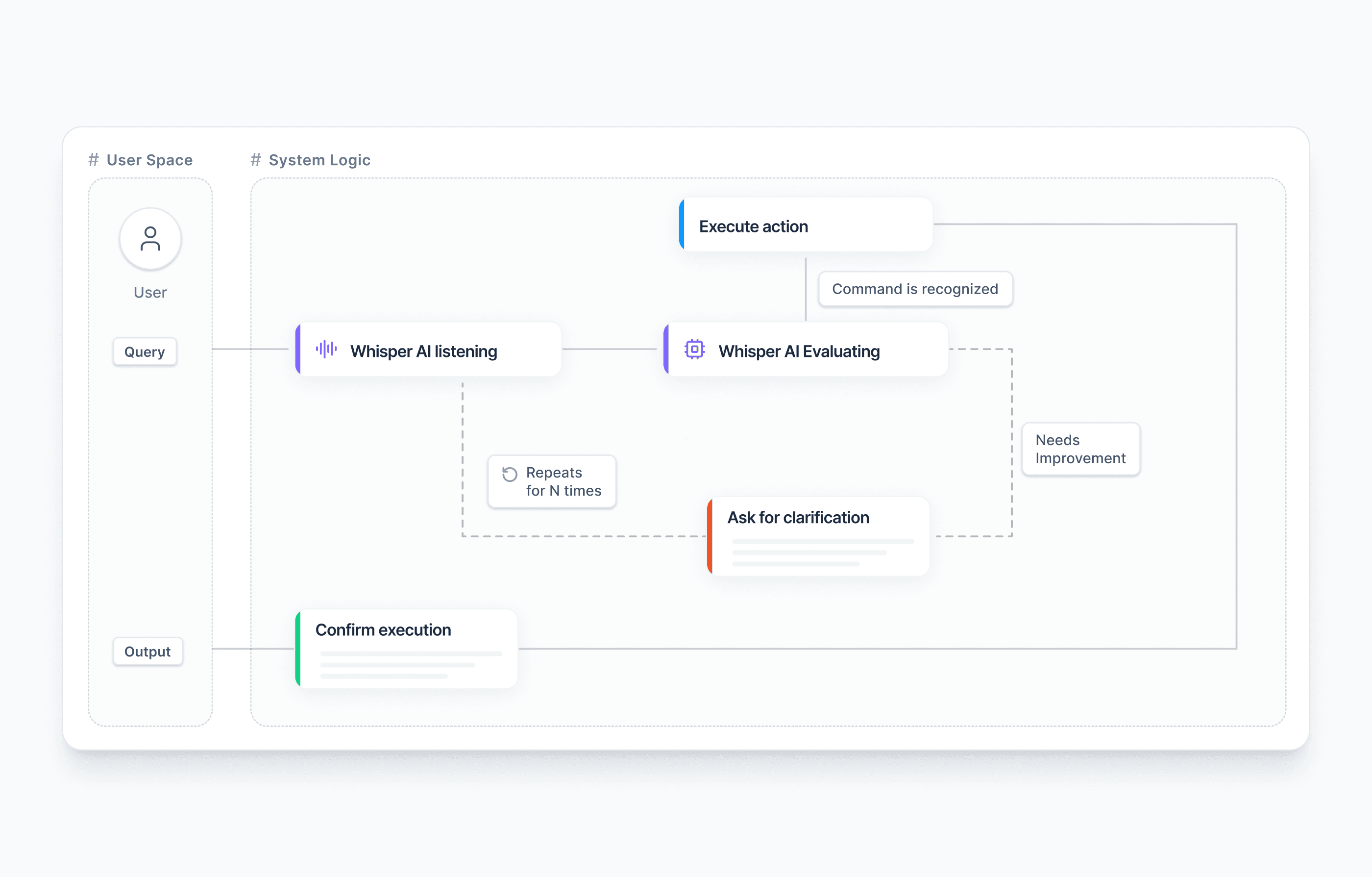
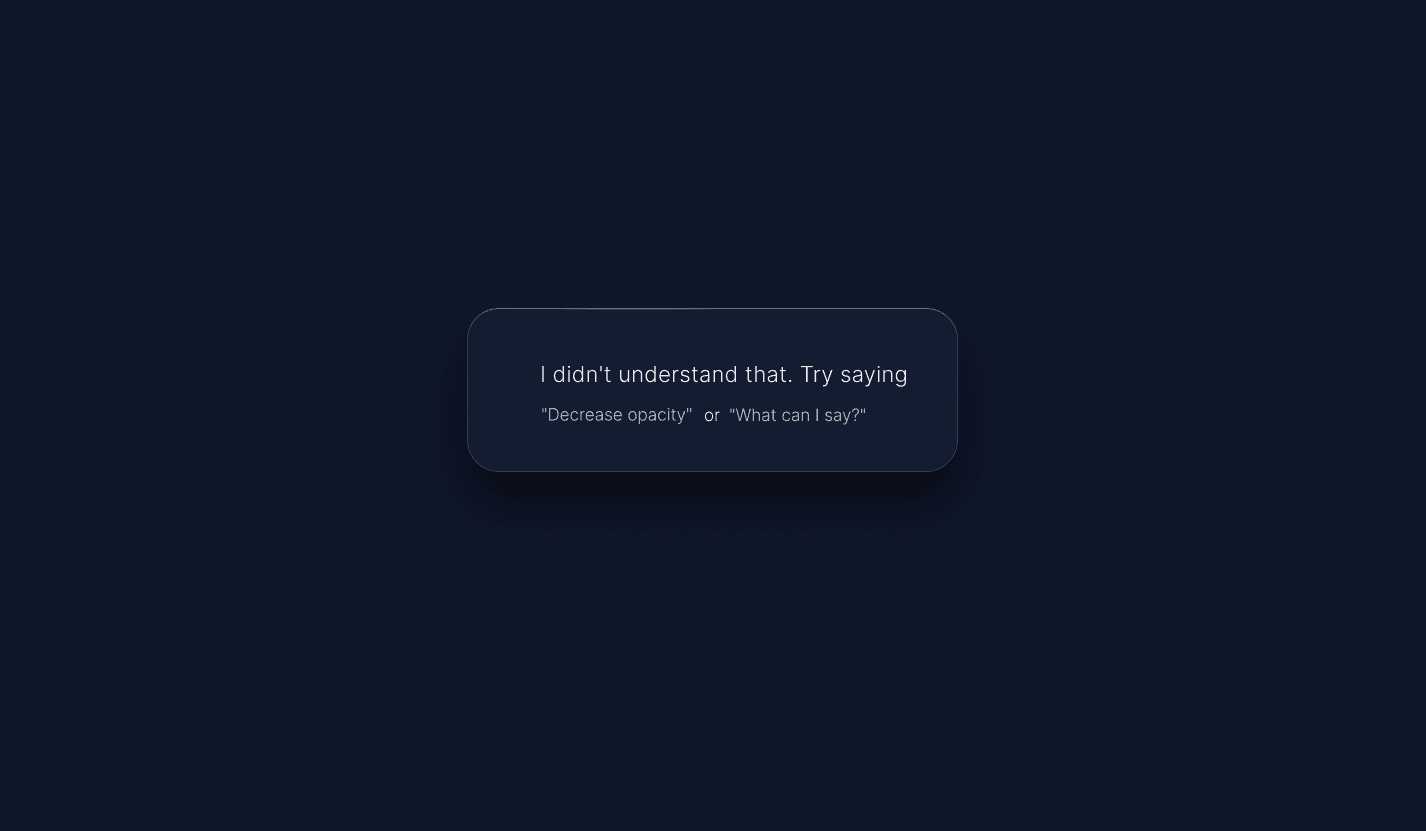
Voice introduces uncertainty that traditional controls handle differently. A command may be misheard, incomplete, or difficult to interpret, so the interface needs to make its current state and the next available action clear.
I focused on communicating when the system was listening, when a command was recognized, and when the user needed to repeat or correct an instruction. With engineering, I defined the command path: recognized commands executed and were confirmed, while unclear ones triggered a clarification prompt.
01 · Command
The system can’t match what the scientist said.
02 · Feedback
“I didn’t understand that. Try saying ‘Decrease opacity’ or ‘What can I say?’”
03 · Next action
The scientist repeats a valid command or asks “What can I say?”
Scientific analysis involves different kinds of interaction. Voice worked well for frequent commands with predictable outcomes, while existing controls remained important for precise manipulation and more complex visual adjustments.
I designed voice as another way to access the same capabilities, allowing scientists to choose the interaction method that suited the task.
The final solution reduced the time required to complete common workflows by 41%. For supported commands, voice also replaced multi-step menu sequences: adjusting opacity, for example, went from five manual steps to a single spoken command.
Designing voice interaction for scientific software required balancing flexibility with predictable execution. Supporting different ways of expressing an action made the system more natural to use, but scientists also needed clear feedback and a reliable way to recover when recognition failed.
I carried those considerations through the command structure, interaction states, and testing. Voice worked best as an additional way to execute familiar actions while keeping direct controls available.