Product design · Product strategy
Designing Job Search Around Candidate Preferences
Rethinking job discovery on LinkedIn.
LinkedIn makes it possible to explore thousands of job opportunities. But more listings don’t always mean more choices.
A candidate can narrow a search by role, location, or experience, only to encounter the same openings across multiple locations, overlapping filters, and jobs they’ve already considered. Finding something new can take more effort than finding more results.
What if job search remembered what candidates were looking for, what they’d already seen, and what they weren’t interested in?
That question shaped this exploration: designing a search experience that gives candidates more control over their results and makes relevant opportunities easier to discover.
01Where the experience breaks down
Problem 01
Search controls are complex, but still limit candidate choice
LinkedIn combines traditional filters with overlapping industry suggestions, making it difficult to understand how search criteria affect results. Meanwhile, candidates have limited ways to exclude unwanted employers, search across multiple locations, or refine their preferences.
More search options don’t always translate into greater control.
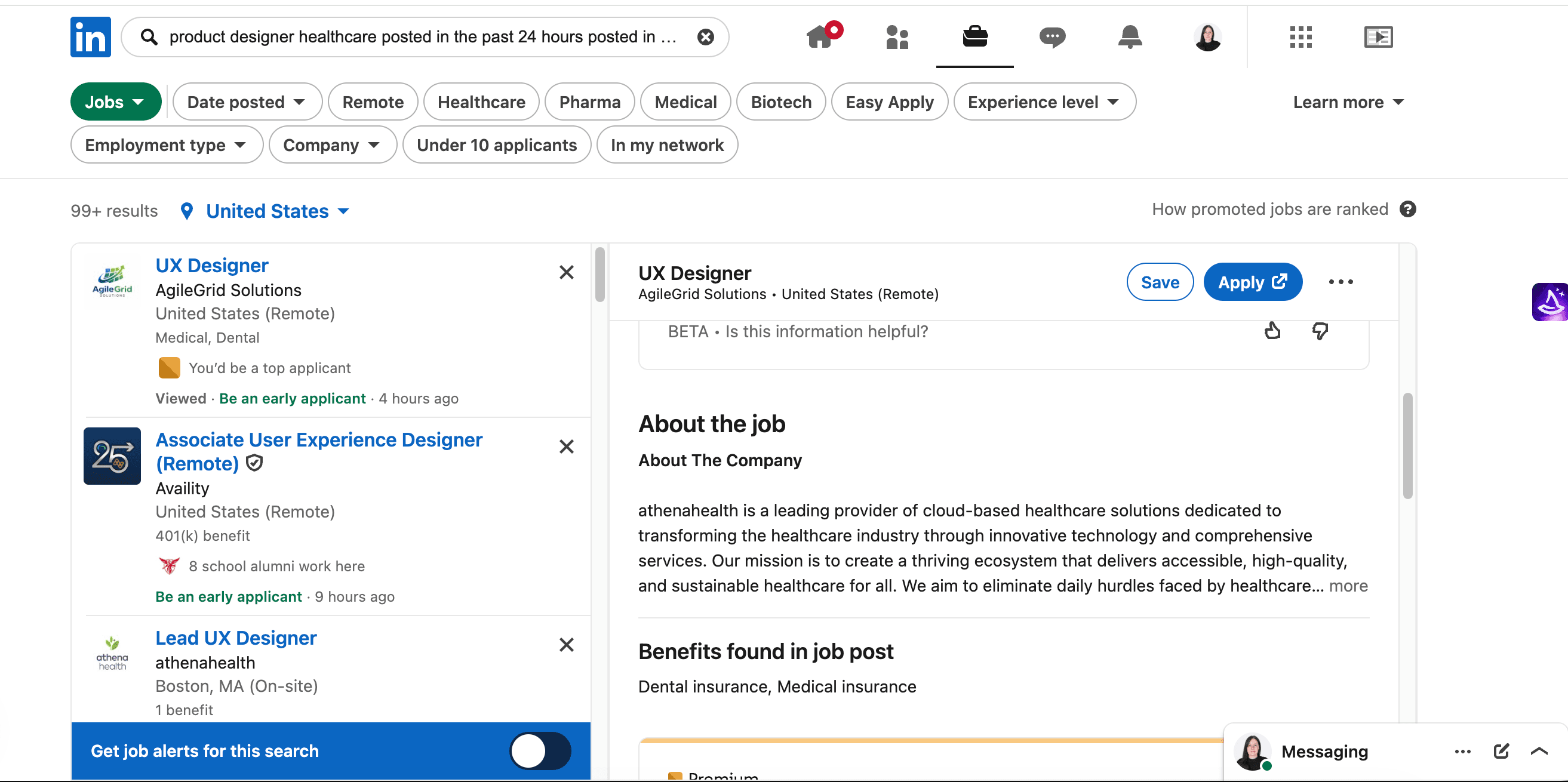
- 1. Longer search requests are difficult to review and edit.
- 2. Healthcare, Pharma, Medical, and Biotech overlap, and sit alongside standard filters.
Problem 02
Repeated listings compete with new opportunities
The same job opening can appear repeatedly across different locations, while previously reviewed or applied-to jobs continue occupying space in search results. This makes it harder to identify opportunities candidates haven’t already considered.
More listings don’t necessarily mean more distinct opportunities.
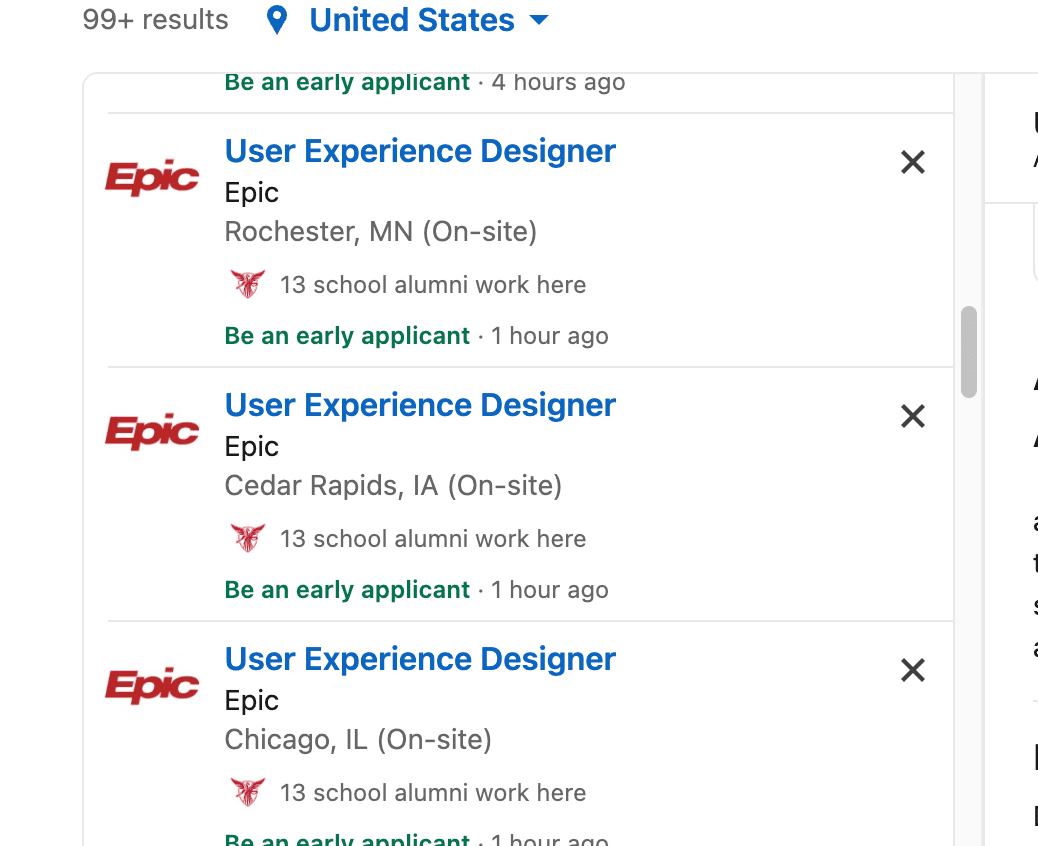
- 1. The same title and employer, three times in a row.
- 2. Only the location differs. Nothing says whether this is one opening or three.
02Design priorities
A simpler search, with more control over the results
The redesign focuses on simplifying search controls, preserving candidate preferences, and reducing repeated listings.
Simplify search
Make frequently used filters easy to access and keep detailed preferences organized in one place.
Give candidates control
Let candidates exclude employers, manage hidden jobs, and retain their preferences.
Improve discovery
Reduce repeated listings and make new opportunities easier to find.
03The proposed experience
Keep job evaluation at the center of search
Candidates should be able to refine a search without interrupting the process of reviewing opportunities. Quick filters remain accessible, while more detailed preferences open separately. The results list and selected job stay in place.
Matches your requirements (5)
2 listings excluded by your filters.
Related opportunities (8)
Relevant, but each misses a requirement. The card says which.
Quill Health · Promoted
Senior Product Designer, Telehealth
San Francisco, CA · Hybrid · Full-time · Posted 3 days ago
- Compensation
- $165,000–$195,000
- Disclosed in the posting
- Seniority
- Senior
- Stated in the posting
- Company
- Healthcare services
- Mid-size company
- Apply clicks
- 230
- Clicks on Apply
Why this job appears
Matches your selected seniority, industry, location, and date posted.
- Seniority · required: Senior, stated in the posting
- Industry · required: Healthcare services
- Location · required: San Francisco, CA
- Date posted · required: Posted 3 days ago
About the role
Quill Health offers video visits for primary care and behavioral health through health plans. About a third of its patients are over 60.
The telehealth team is rebuilding the visit experience, from check-in to follow-up instructions, with a goal of fewer dropped or delayed visits.
Responsibilities
- Design the full video visit flow, including check-in, waiting, the visit, and follow-up.
- Make the experience work for older patients and people joining from low-bandwidth connections.
- Run moderated usability studies every sprint.
- Work closely with clinicians to define what happens when a visit fails.
Qualifications
- 5+ years in product design.
- Experience designing real-time or communication products.
- Strong accessibility practice, including testing with assistive technology.
- Hybrid in San Francisco, two days a week.
04Decisions and tradeoffs
What I changed and why
Priority 1 · Simplify search
Three quick filters, with everything else in one place
Workplace, date posted, and seniority stay on screen because they change most between searches. More specific criteria move into an All filters dialog, organized by topic, with a line under the filters that lists everything applied.
Tradeoff
Less-used filters take one more click. Showing every applied criterion under the filters keeps that cost visible and small.
- 1. The three filters candidates change most often stay on screen.
- 2. Everything else is one click away, with a count of what’s applied.
Priority 1 · Simplify search
Industry groups and multiple locations
Candidates choose a group, such as Healthcare & Life Sciences, or narrow it to specific categories, so they don’t have to guess how overlapping labels differ. Locations work the same way: several cities in one search, with remote roles included.
Tradeoff
Broad groups surface more jobs but include less relevant ones. Each job still shows its category, and narrowing the group is one click.
- 1. Take the whole group to search broadly.
- 2. Or narrow it. A plain “healthcare” request selects services and clinical software.
Priority 1 · Simplify search
Required and preferred criteria
A required condition decides what counts as a match. A preferred one only changes the order. Candidates choose which applies, so they know when a setting could remove a job from view.
Tradeoff
A strict salary requirement hides jobs that don’t list pay. As a preference, those jobs stay visible and are labeled.
- 1. Required: jobs without a qualifying range move out of the matches.
- 2. Preferred: they stay in the results, ranked lower and labeled.
Priority 2 · Give candidates control
Hidden jobs and companies that stay hidden
Hiding a job or an employer applies to every search, along with settings like hiding reviewed or applied-to jobs. Everything hidden is listed in Search preferences and can be restored.
Tradeoff
A dismissed job can change later, for example by adding a salary or a remote option. Keeping hidden jobs recoverable limits the cost of hiding too much.
- 1. Preferences carry over to the next search, so candidates don’t set them again.
- 2. Hidden jobs and companies stay listed in one place, and can be restored one at a time.
Priority 3 · Improve discovery
One card per opening, and unseen jobs first
Listings the employer identifies as the same opening appear as one card, with each location and its eligibility inside. Candidates can also rank jobs they haven’t opened ahead of ones they have.
Tradeoff
Consolidation depends on knowing two listings are the same requisition. Matching titles and employers isn’t proof, so only listings with a shared opening ID are combined. Promoted jobs follow the same rule and count once across locations, which keeps promotion useful without filling the list.
- 1. Three listings that share an opening ID become one card.
- 2. Each location keeps its own eligibility details.
First version
- Quick filters and an organized All filters dialog
- Required and preferred criteria
- Agency and employer exclusions
- Hidden jobs and companies, managed in Search preferences
These rely on information the search already has: the query, the filters, and the listing fields.
Later
- Combining equivalent postings. Needs a verified way to know listings share a requisition, likely supplied by employers. Repeated titles alone aren’t enough.
- Industry groups. The groupings need testing to see where broad searches help and where they add noise.
- Preferences across devices. Saving them to the account, with a clear way to review and reset.
05How I’d test it
Main measure
Relevant new opportunities found per search session
Candidates would complete the same search tasks in LinkedIn today and in the prototype: find roles, change the date range, exclude agencies, hide an employer, and find a job they haven’t seen before.
Proposed measures
- Time to first relevant job
- From search to the first saved or opened match
- Duplicate exposure
- How often the same opening is shown again
- Search corrections
- How often a search is edited after it runs
- Constraint compliance
- Share of matches that meet every requirement
- Task success
- Across the comparison tasks