Turning Cross-Device Complexity Into a Coherent Classroom Workflow
As syGlass expanded to more schools, I redesigned the teacher and student web platform to connect lesson setup, launch, and student submission before the new school year.
IstoVisio · Education · Web · K–12
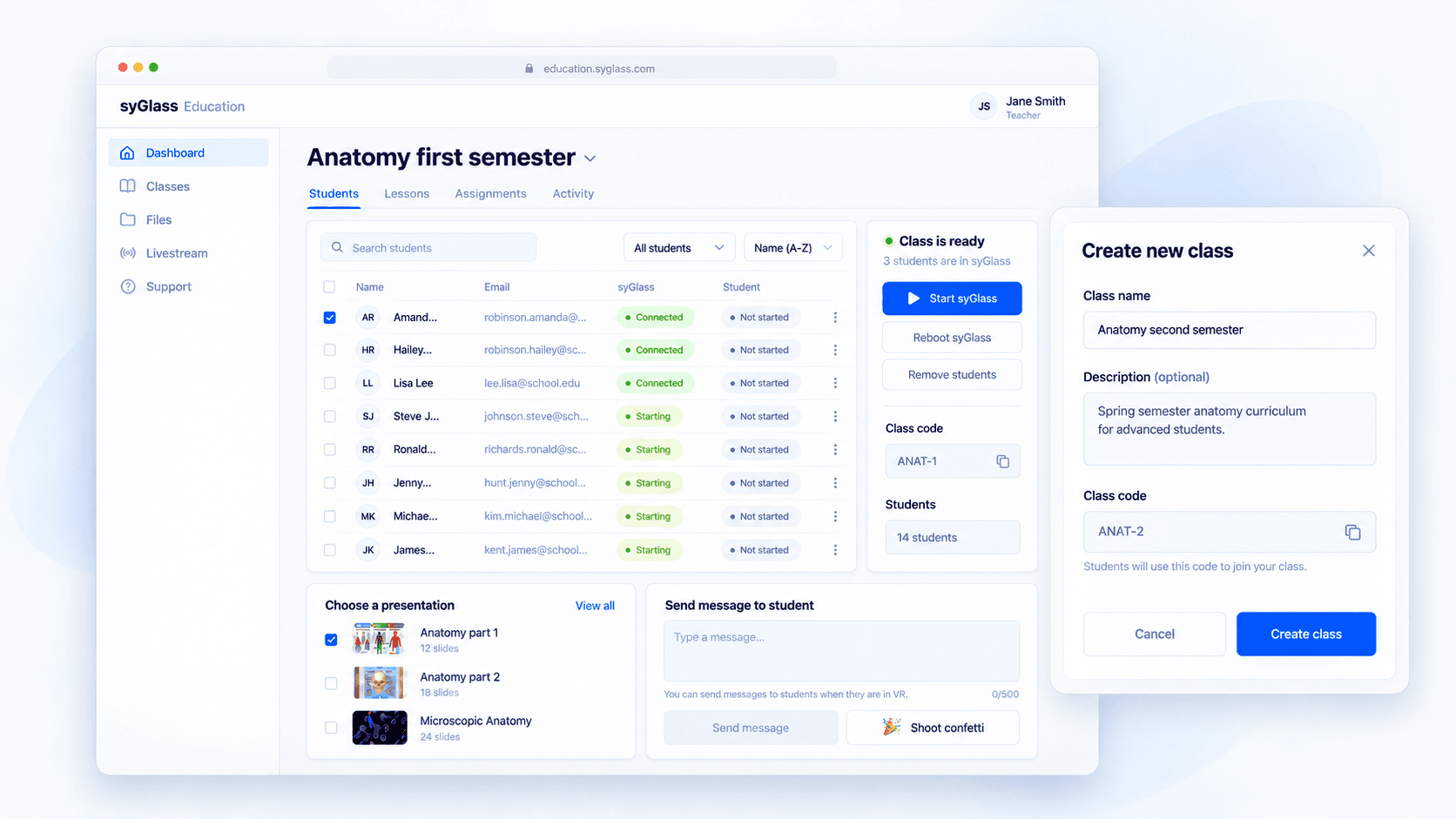
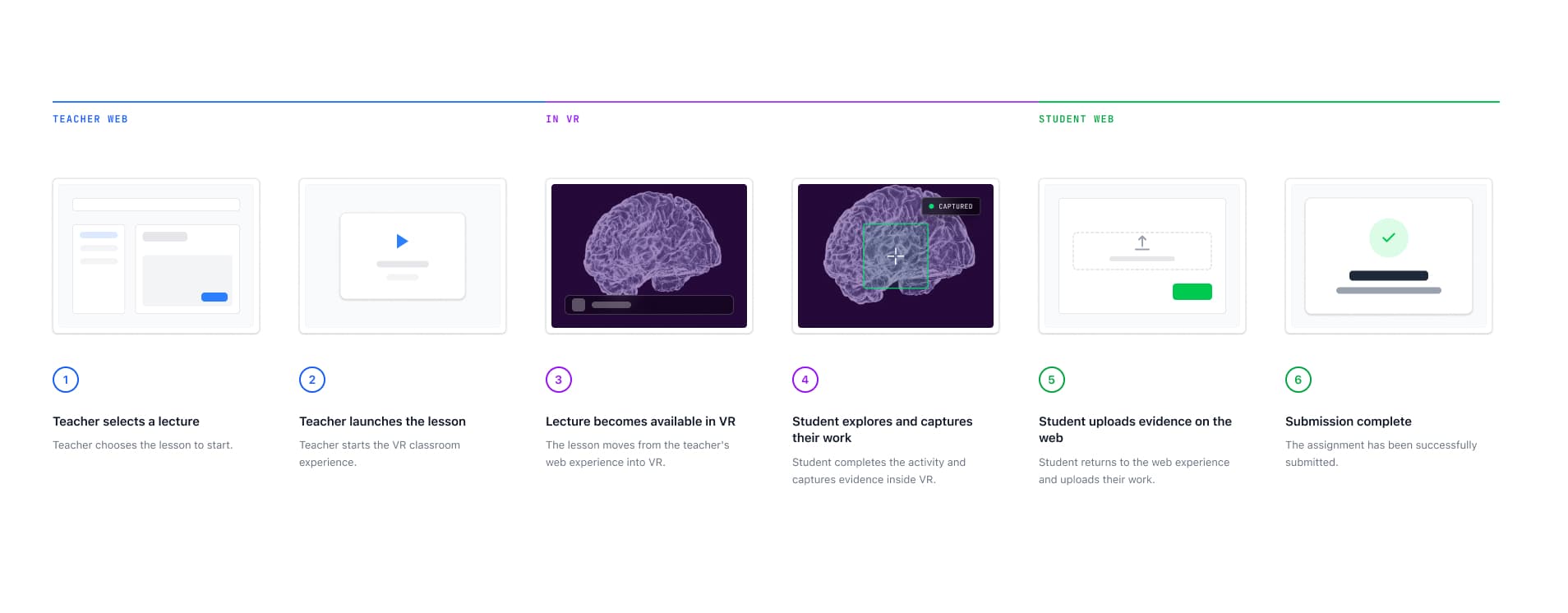
syGlass was expanding its scientific visualization platform into schools. A teacher would prepare a lesson on the web, launch it for students to experience in VR, and then students would return to the web to complete and submit their work.
But that classroom workflow had grown around the technology rather than around how teachers actually ran a class. Teachers were already reaching out to the team for help with lesson setup, launch, and troubleshooting.
With more schools coming on board before the new school year, that support model would not scale. I had about 2.5 months to redesign the teacher and student web experience so a class could move from preparation to submission with less technical help.
Problem
The problem was not one broken screen. It was that the product was organized around separate features while teachers were trying to run one continuous class.
Students, lessons, assignments, and lesson launch lived in different parts of the product. Teachers had to connect those pieces themselves as they prepared a lesson, started it in VR, and followed up on student work.
The disconnect became most visible during launch. A teacher could start a lesson from the web without a clear view of whether it was actually ready for students in VR. When something failed, getting the class back on track often meant turning to the team for help.
As more schools adopted syGlass, those gaps became both a classroom problem and a scaling problem.
Making teachers more self-sufficient was necessary for syGlass to support more classrooms without increasing technical support at the same rate.
Solution
I redesigned the web platform around the classroom as the primary organizing structure and connected the workflow from lesson preparation through student submission.
- • Organizing students, lessons, and assignments around the classroom
- • Turning lesson launch into a visible system state rather than a one-time action
- • Building recovery directly into the launch flow
Impact
The redesigned platform gave teachers more control over running a lesson without depending on technical support.
- • 45% fewer teacher support tickets
- • 87% of teachers reported easier navigation
My role
As the lead product designer, I:
- • Led the redesign from research through shipped workflows and validation
- • Defined the classroom-centered information architecture and launch-state model
- • Prioritized the release scope with leadership and engineering around the 2.5-month deadline
- • Aligned web and VR engineers around the end-to-end classroom workflow
A single classroom lesson crossed three environments: teachers prepared it on the web, students experienced it in VR, and students returned to the web to complete their work.
The challenge was making the lesson feel continuous even though preparation, participation, and completion happened in different interfaces and devices.
Each handoff could interrupt the classroom flow, so I looked at the lesson as one end-to-end experience rather than three separate interfaces.
I combined teacher interviews, recurring support issues, a platform audit, and Jobs to Be Done with journey mapping to understand where the classroom workflow was breaking down.
Teacher interviews
How teachers prepared and ran lessons
Support issues
Where teachers repeatedly needed help
Platform audit
Where the product fragmented the workflow
JTBD + journey mapping
How the full lesson fit together
What looked like several usability problems turned out to be one structural problem.
The product did not preserve classroom context across the full lesson.
To understand that structural problem from every side, I looked at the same classroom journey from four perspectives.
Teacher
Can I prepare and run the class without stopping to figure out the system?
Student
Can I move through the lesson and complete my work without losing context?
Business
Can we support more schools without increasing support at the same rate?
Engineering
Can recurring classroom problems be handled by the product instead of becoming support requests?
Looking across those perspectives, three problems consistently created the most friction and had the biggest impact on whether a class could run successfully.
01
Teachers organized their work around a classroom. The platform did not.
Students, lessons, and assignments belonged to the same teaching context, but the product treated them as separate areas.
Design implication: Keep classroom work connected in the information architecture.
02
Teachers could launch a lesson without knowing whether it was ready for students.
The teacher acted on the web, while the result appeared inside VR.
Design implication: Show the system state after the teacher clicks Launch.
03
When a launch failed, teachers needed to recover without leaving the lesson flow.
During a live class, waiting for technical support could interrupt the lesson.
Design implication: Build recovery into the launch flow.
With 2.5 months before the new school year, redesigning the entire product was not realistic.
The biggest classroom problems were not inside the core VR lesson. They happened around it: preparing a lesson, launching it, knowing whether it worked, recovering when it did not, and completing the work afterward.
I kept the core VR experience outside the redesign, limiting my VR scope primarily to teacher and student login.
I focused the rest of the work on the web platform surrounding the lesson, where we could reduce the most classroom and support friction within the time we had.
Decision 01
Organize the product around the classroom
The first problem was structural: teachers thought in terms of a class, but the product was organized around separate capabilities.
I tested three ways to reorganize the platform against the classroom workflow.
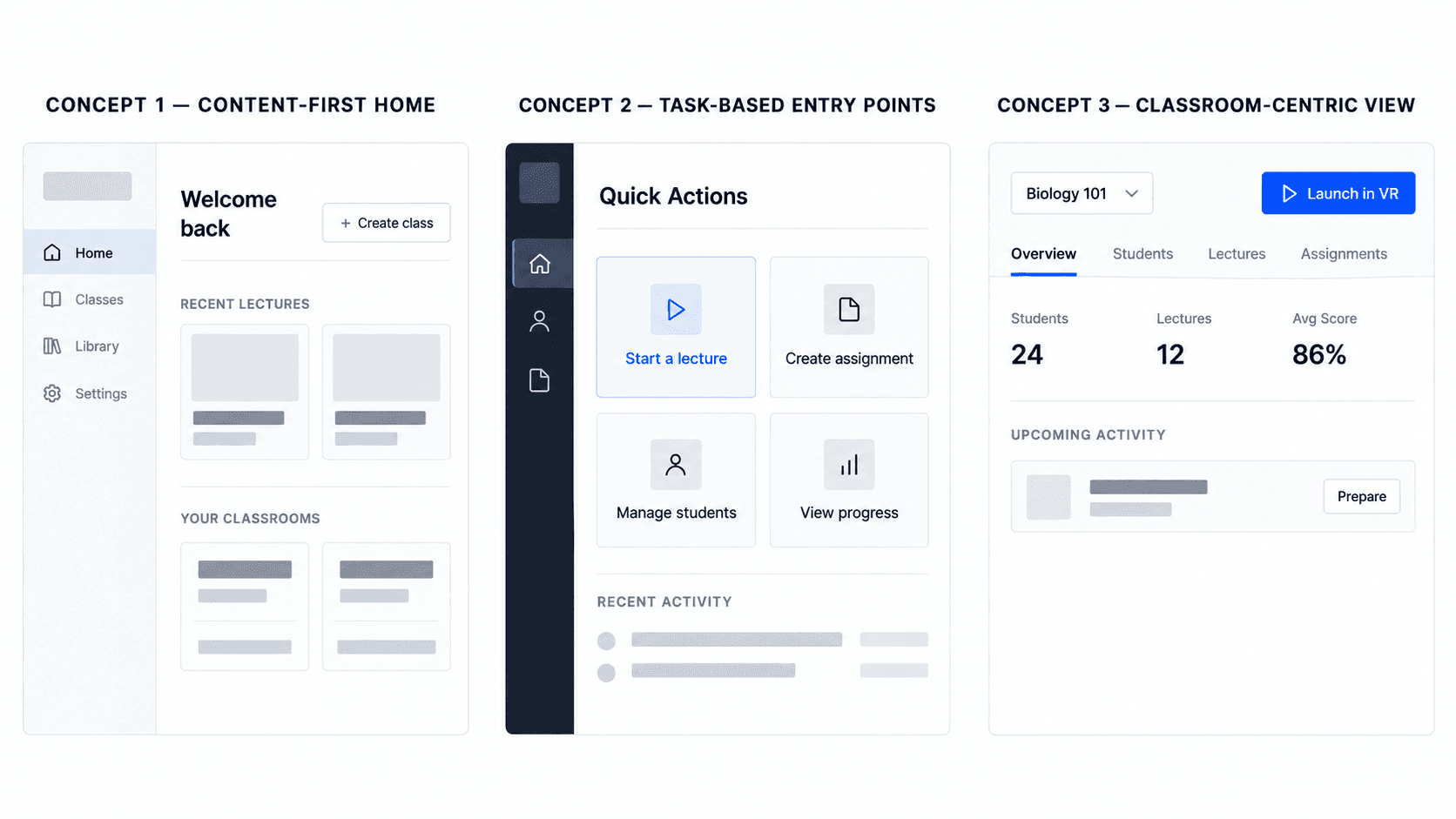
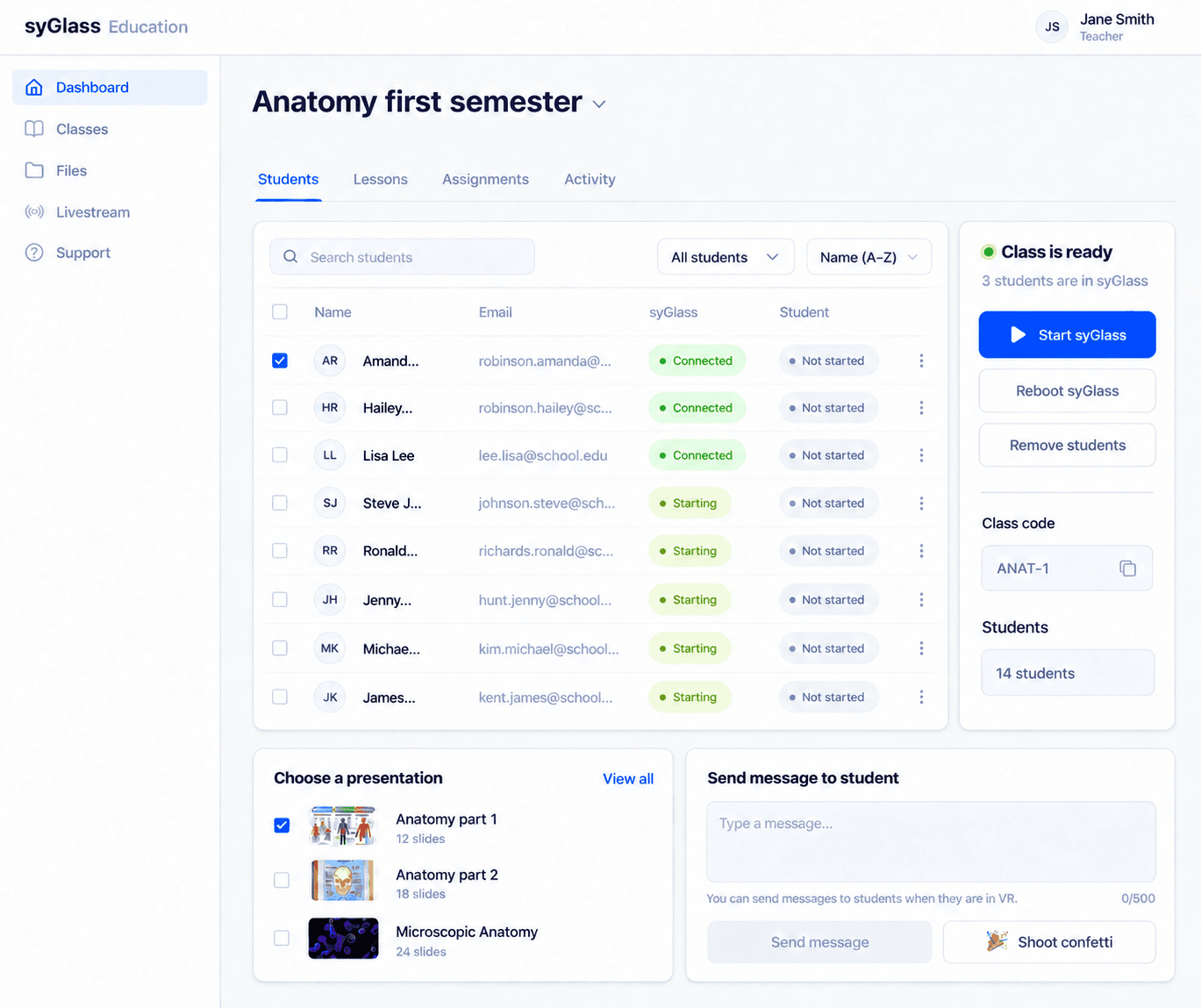
I chose the classroom-centric view because it matched the unit teachers were already using to organize their work: the class itself.
Content-led made lectures easier to find but separated them from the students and assignments around them. Task-led made individual actions clearer but still required teachers to move between contexts. Classroom-centric kept the people, content, assignments, and activity for a class together.
Teachers were not separately managing content, students, and assignments. They were running a class.
From a classroom, a teacher could now manage students, prepare lessons, launch them, and follow up on assignments without rebuilding context across separate areas of the product.
Decision 02
Launch is a state, not a button
Launch was the most fragile handoff in the workflow.
The teacher clicked Launch on the web, but the meaningful result happened somewhere else: inside the students’ headsets.
Teachers needed visibility into what happened after the click.
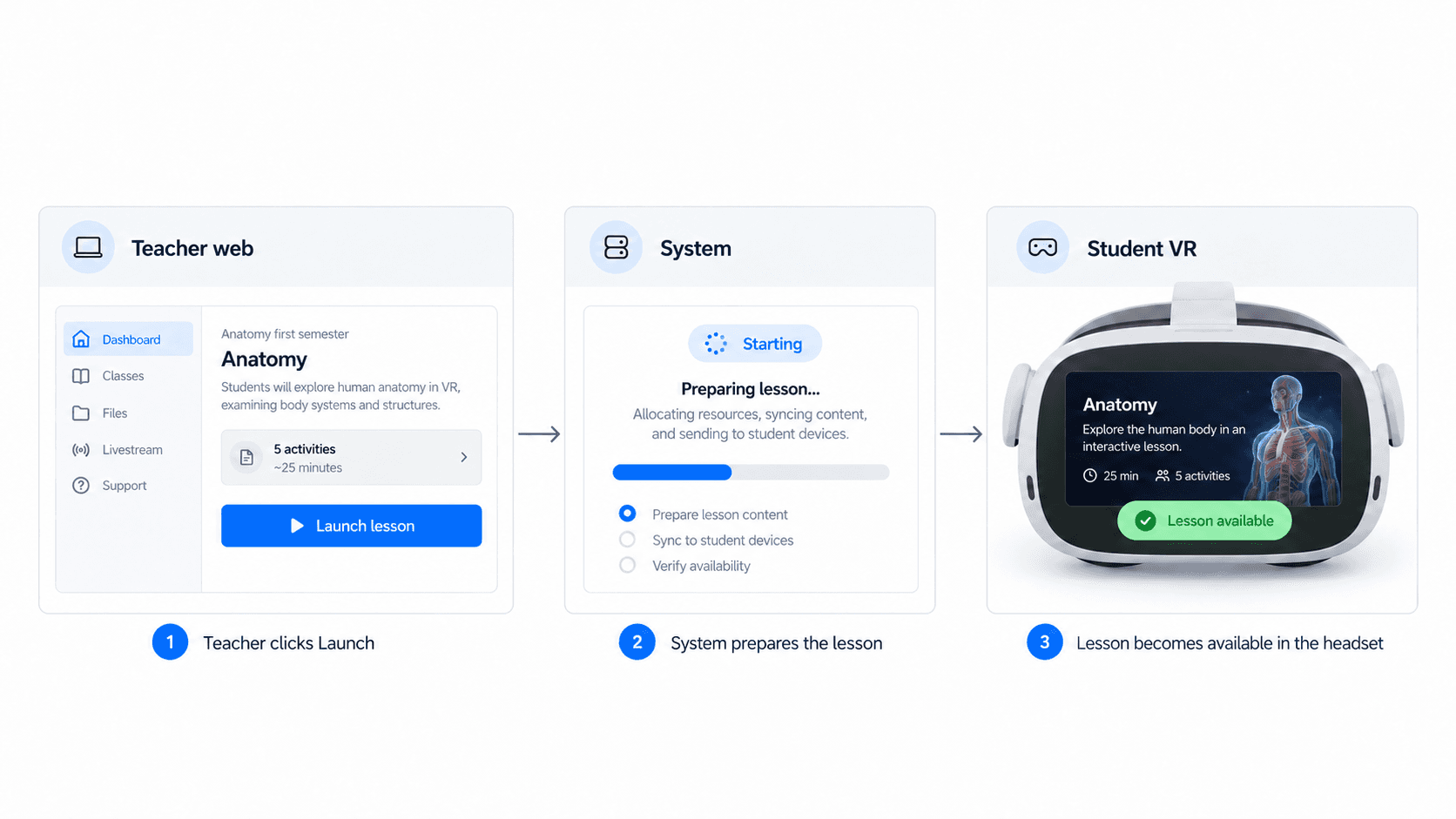
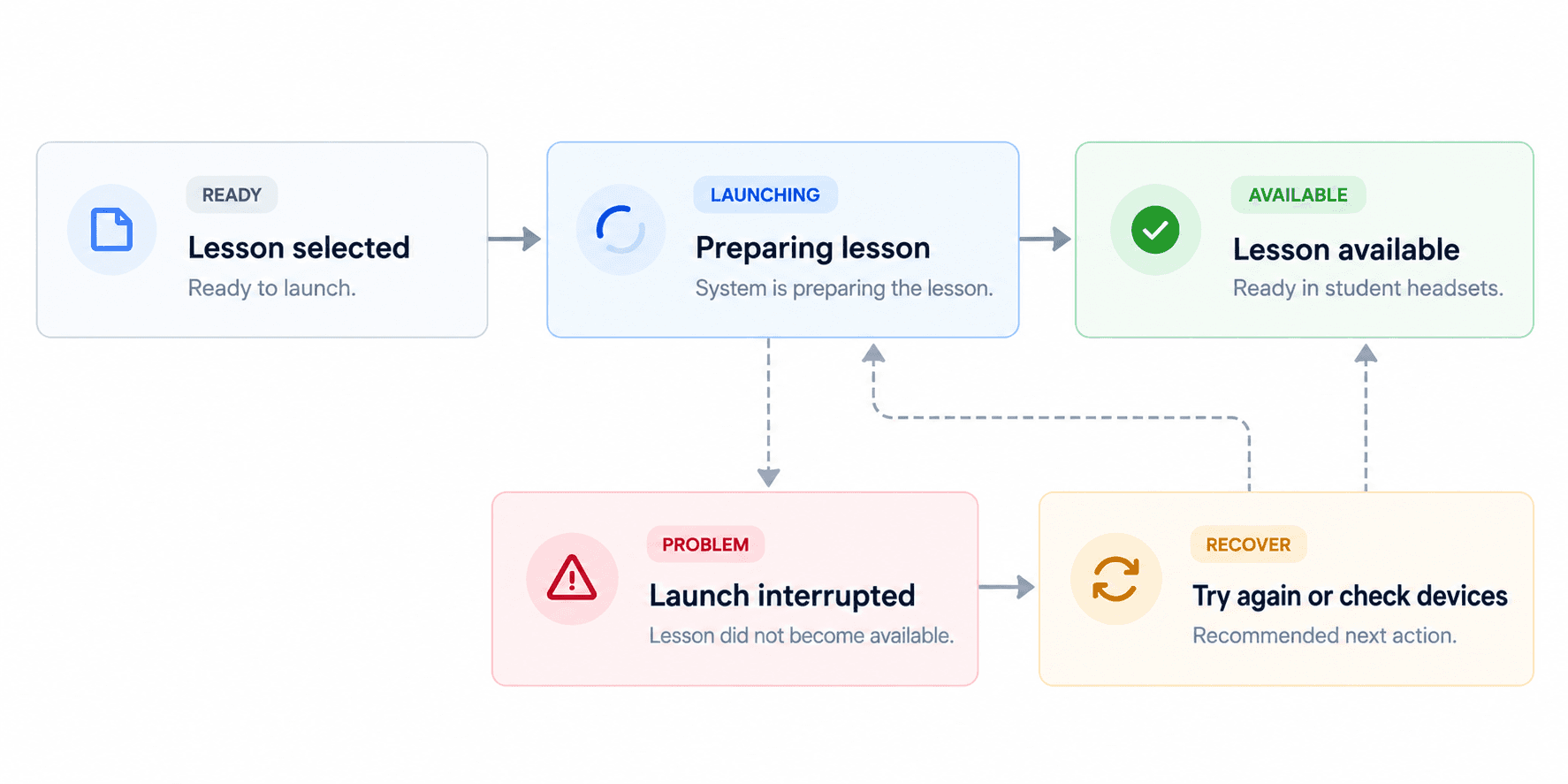
That led me to define launch as a set of system states the teacher could see.
I worked with engineering to define what the teacher needed to know as the lesson moved from ready, to launching, to available.
Decision 03
A failed launch could stop the entire class
Making launch visible solved the successful path. The harder question was what happened when the system did not reach the expected state.
A teacher could have an entire room of students waiting while trying to understand why a lesson was not appearing in their headsets.
The teacher should not need to diagnose whether the problem came from the web platform, VR, or another technical layer.
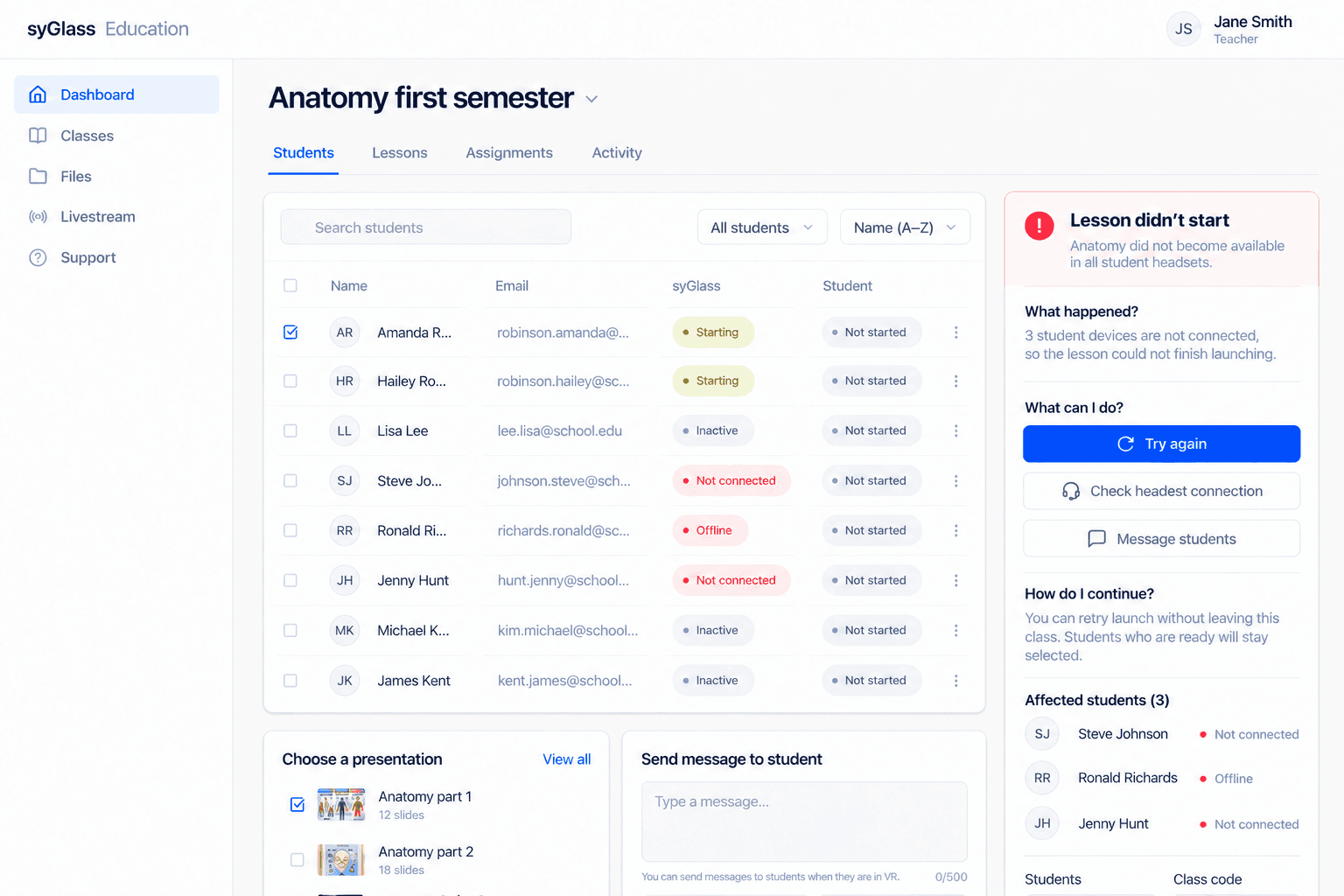
So I designed recovery as part of the launch workflow itself.
The recovery experience needed to answer three questions:
What happened?
Give the teacher enough information to understand the problem.
What can I do?
Provide the most relevant next action.
How do I continue?
Keep recovery or retry inside the same lesson workflow.
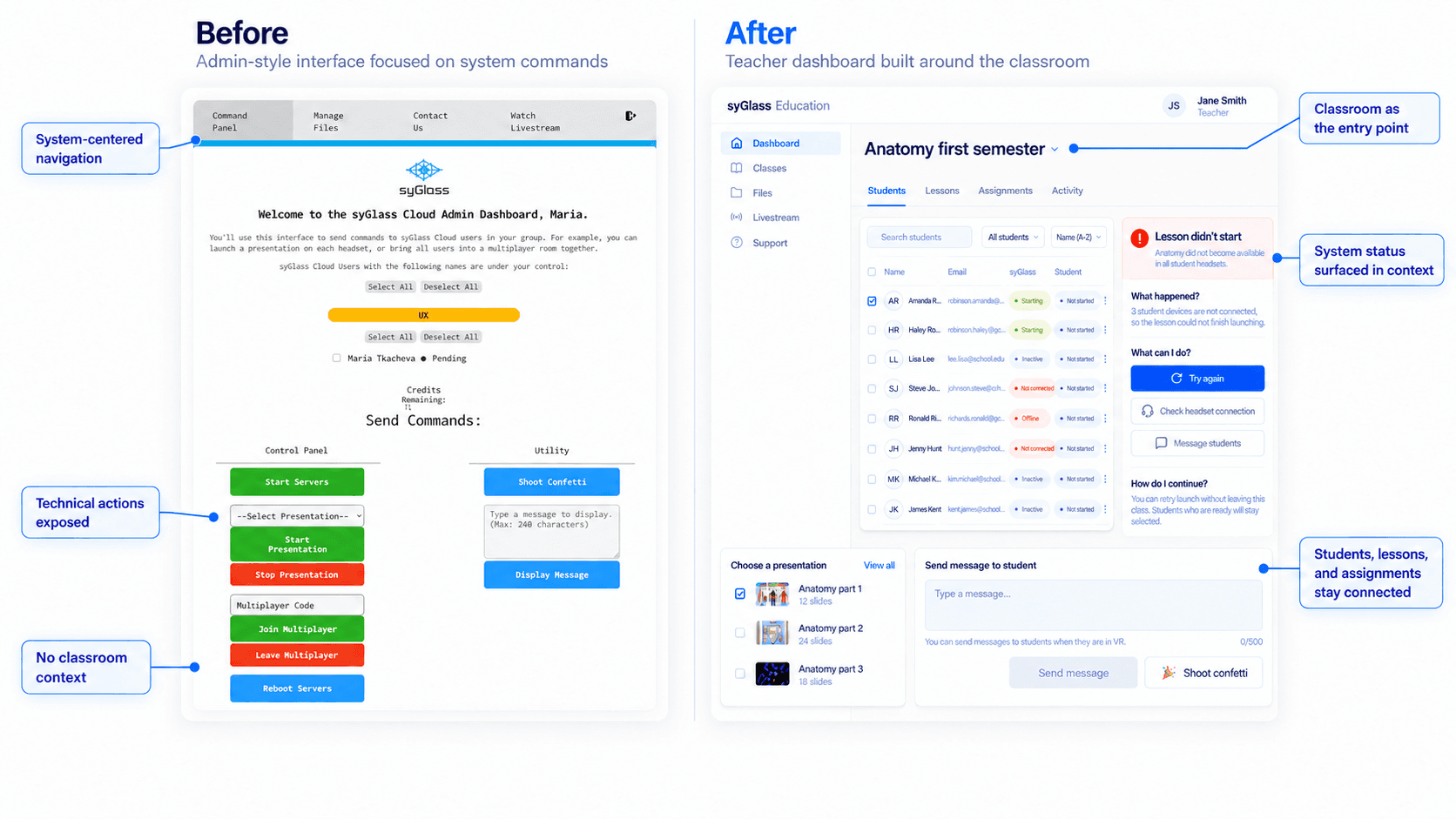
Before
Something failed. Find help.
After
Something failed. Here’s what happened and what to do next.
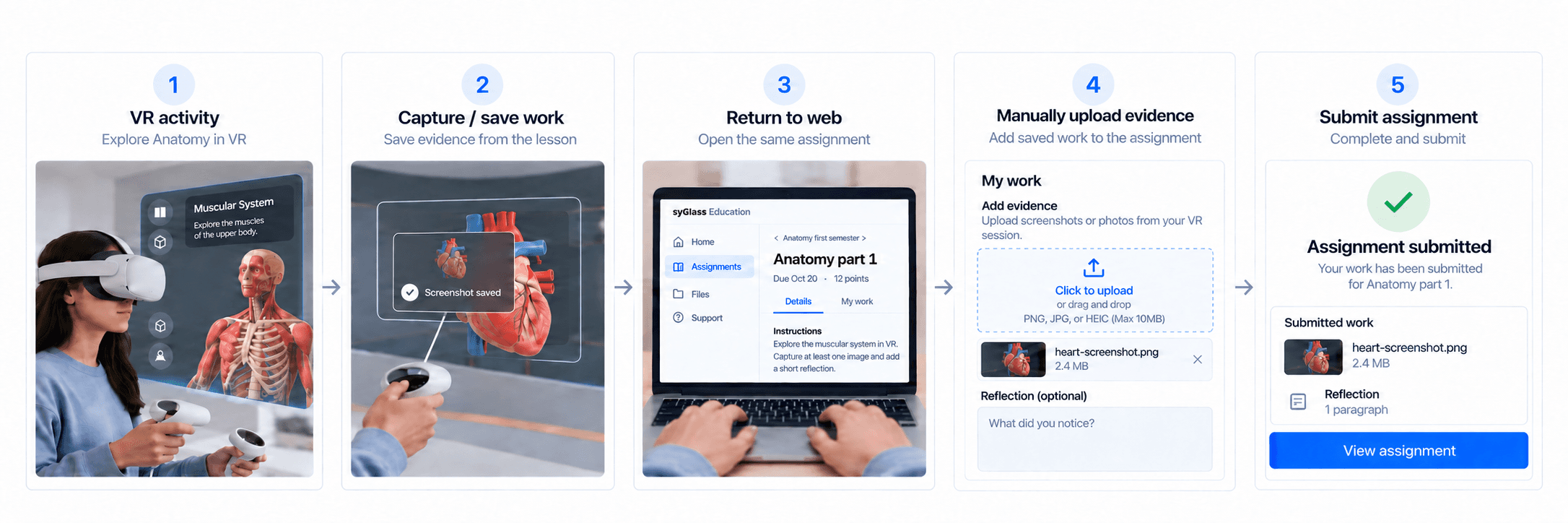
The student side introduced a different constraint: schools often had fewer headsets than students.
A class might have 30 students but only 10–15 headsets, so completing an assignment could not depend entirely on VR.
After a VR activity, students could return to the web, reconnect with the same assignment, manually add evidence of their work, and submit it.
The goal was to make the transition out of VR feel like a continuation of the same assignment.
I brought IA and system models into feasibility reviews early, aligned web and VR behavior before detailed design, and reviewed builds weekly to catch workflow gaps during implementation.
The redesign shipped before the school year.
87%
of teachers reported easier navigation.
45%
fewer teacher support tickets.
The larger change was structural.
Teachers had more control over the classroom experience without needing to understand the technical system behind it.
Students had a clearer path through the parts of the lesson that happened outside the headset.
And routine classroom problems were less likely to become engineering support problems.
This project changed how I think about products that span multiple people and devices. The hardest problems weren’t always inside an individual interface. They happened at the transitions between teacher and system, web and VR, and VR and student web.
Designing those transitions meant treating context, system state, and recovery as part of the product, not details to solve after the main flow. That’s a principle I’ve carried into the products I’ve designed since.
The redesign solved the most urgent classroom workflows before the school year, but it also exposed opportunities for the next version.
Automatic student capture transfer
Move work created in VR directly into the student’s assignment and remove another manual step.
Class-level diagnostics
Give teachers a persistent view of device health, connection issues, and recurring problems across the entire class session.
Teacher analytics
Help teachers understand participation, completion, and classroom activity over time.